Planet Zoo 2 Zoo Tour: New Features and Gameplay Mechanics
Explore the latest gameplay features in Planet Zoo 2, including enhanced animal behaviors, dynamic aquatic habitats, and improved creative tools for your parks.
Published: Planet Zoo 2 Wiki Editorial Team
Table of Contents
Visual Fidelity and Engine Upgrades
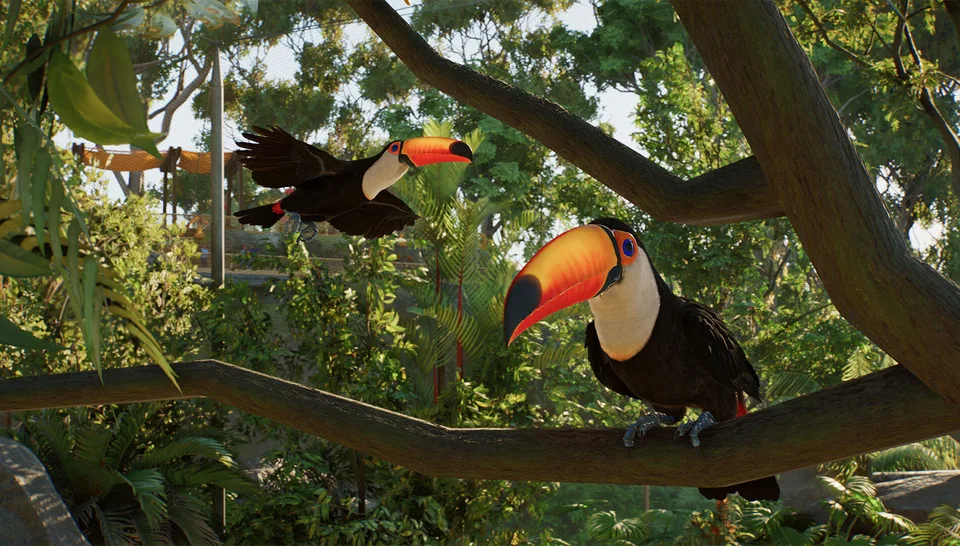
The first thing players will notice in Planet Zoo 2 is the significant leap in visual fidelity. Frontier Developments has transitioned to a new version of their internal engine, Cobra, which provides the foundation for several key graphical enhancements. The most impactful change is the implementation of global illumination—an entirely new lighting system that creates more believable environments.
This change is not just aesthetic; it affects gameplay and immersion. For example, when guests or staff move into covered areas like caves or tunnels, the game now calculates proper light occlusion. This means shadows are more realistic, and the overall balancing of light and dark is more consistent. The resolution across textures has been exponentially increased, ensuring that environments feel authentic and alive.
The engine also supports dynamic physics-based rendering. This is most visible in how light interacts with water—a major focus for the development team. The inclusion of crepuscular rays (god rays) and dynamic caustics ensures that water bodies, from small ponds to massive aquariums, look and behave naturally as the sun shifts through the sky.
Enhanced Animal Behavior and Interaction
Planet Zoo 2 pushes the boundaries of animal realism. The developers have moved beyond basic locomotion to create animals that feel truly alive. One of the most notable features is the "living UI" concept, where you can often tell an animal’s welfare status without checking the menu, simply by observing their behavior and vocalizations.
Mood-Based Animations
Animals now feature layered animations that express their current mood. If a Sumatran tiger is thirsty, you will see it in their movement and hear it in their vocalizations. This makes the management aspect of the game more intuitive, as players can visually identify problems in their habitats rather than relying solely on spreadsheets or status bars.
Dynamic Interaction
In the previous Planet Zoo, many interactive behaviors were tied to specific enrichment items. In Planet Zoo 2, animals can perform natural behaviors—such as scratching, rubbing, and resting—on almost any appropriate surface, including trees, rocks, and plants.
Tip
To maximize animal welfare, ensure your habitats provide a variety of natural surfaces. Since animals now interact dynamically with the environment, placing rocks and trees strategically allows them to engage in natural scratching and rubbing behaviors more frequently, which improves their overall happiness.
Creative Tools and Pathing Advancements
The building system in Planet Zoo 2 aims to lower the "floor" for new players while keeping the "ceiling" high for veterans. This means that while beginners can quickly assemble beautiful parks, experienced builders have the depth required to create highly detailed, custom structures.
Pathing and Customization
The pathing tools have been significantly overhauled, incorporating advancements from Planet Coaster 2. Players now have access to circular stamps for plazas, allowing for faster and more efficient path placement. Furthermore, almost every scenery item and path is now "flexi-color," and the ability to scale objects has been added. This level of customization allows for infinite creative possibilities, ensuring that no two zoos look the same.
The In-Game Workshop
A major quality-of-life improvement is the integration of the Steam Workshop directly into the game browser. You no longer need to exit the game to find and download blueprints. You can search for player-created content or Frontier-curated designs with the touch of a button, making it easier than ever to populate your zoo with high-quality structures.
New Habitat Types: Aviaries and Aquariums
The introduction of aviaries and aquariums represents one of the most significant gameplay expansions in the series. These habitats require new approaches to construction and management.
Building an Aviary
The aviary system is designed as an extension of the existing habitat tools. It is intuitive and flexible, allowing players to create custom shapes without being restricted to pre-made assets.
Define the Perimeter: Place your barriers to define the habitat area, just as you would for a land animal.
Add Supports: Place supporting poles where you want the structure to stand. You can adjust the height and angle of these poles dynamically.
Generate Roof: Click the generation button to instantly fill the gaps between your poles, creating a custom roof.
Refine: Use the "sag slider" to adjust the rigidity and tautness of the roof material, giving it a more realistic or stylized look.
Aquariums and 3D Navigation
Aquariums are not just static displays; they are complex ecosystems. Animals in these habitats (such as the Hawksbill turtle or Ocean sunfish) utilize full 3D navigation. They understand the environment, including rocks, corals, and arches, and will dynamically calculate paths to swim around or through these objects.
Players must also manage different types of aquatic life:
Hero Animals: These are individual animals with specific welfare, feeding, and transport needs.
Shoals: These are groups of fish that behave as a collective, allowing for a rich, populated aquarium environment without the management overhead of individual fish.
Staff Facilities and Guest Experience
A refreshing change in Planet Zoo 2 is the shift toward transparency in zoo management. Previously, staff facilities were often "back-of-house" areas that players would hide away. Now, the game encourages players to break down these barriers.
You can design open-plan staff areas—such as keeper feeding prep stations or vet clinics—that guests can look into. This mirrors the modern zoo philosophy of educating the public about the hard work that goes into animal care. Because the building tools are so flexible (allowing you to remove walls, doors, and roofs), you can create beautiful, airy environments that serve both the staff's needs and the guests' desire to see behind the scenes.
FAQ: Frequently Asked Questions
Is the content in the demo the same as the full game?
No. The demo and the full game are distinct. The demo provides a slice of content, while the full game includes the complete set of features, animals, and gameplay modes.
Can I use pathing tools from previous games?
Planet Zoo 2 introduces new, advanced pathing tools that incorporate features from Planet Coaster 2. While the core concept of placing paths remains, the flexibility, coloring options, and stamp tools are significant upgrades.
How do birds and fish navigate the environment?
Birds and aquatic animals in Planet Zoo 2 use full 3D navigation. They dynamically perceive their surroundings, including obstacles like trees, corals, and custom-built arches, and calculate their own movement paths accordingly.
What is the difference between "Hero" animals and "Shoals"?
"Hero" animals are individual creatures that require specific welfare management (feeding, cleaning, companionship). "Shoals" are groups of fish that are managed collectively to create a visually dense and realistic aquarium environment.